You sent a newsletter on Tuesday. By Friday you had four new bookings. Were they from the newsletter? With most email tools, you'll never know. They can tell you who opened and who clicked, and that's where their view ends. The booking happens somewhere else.
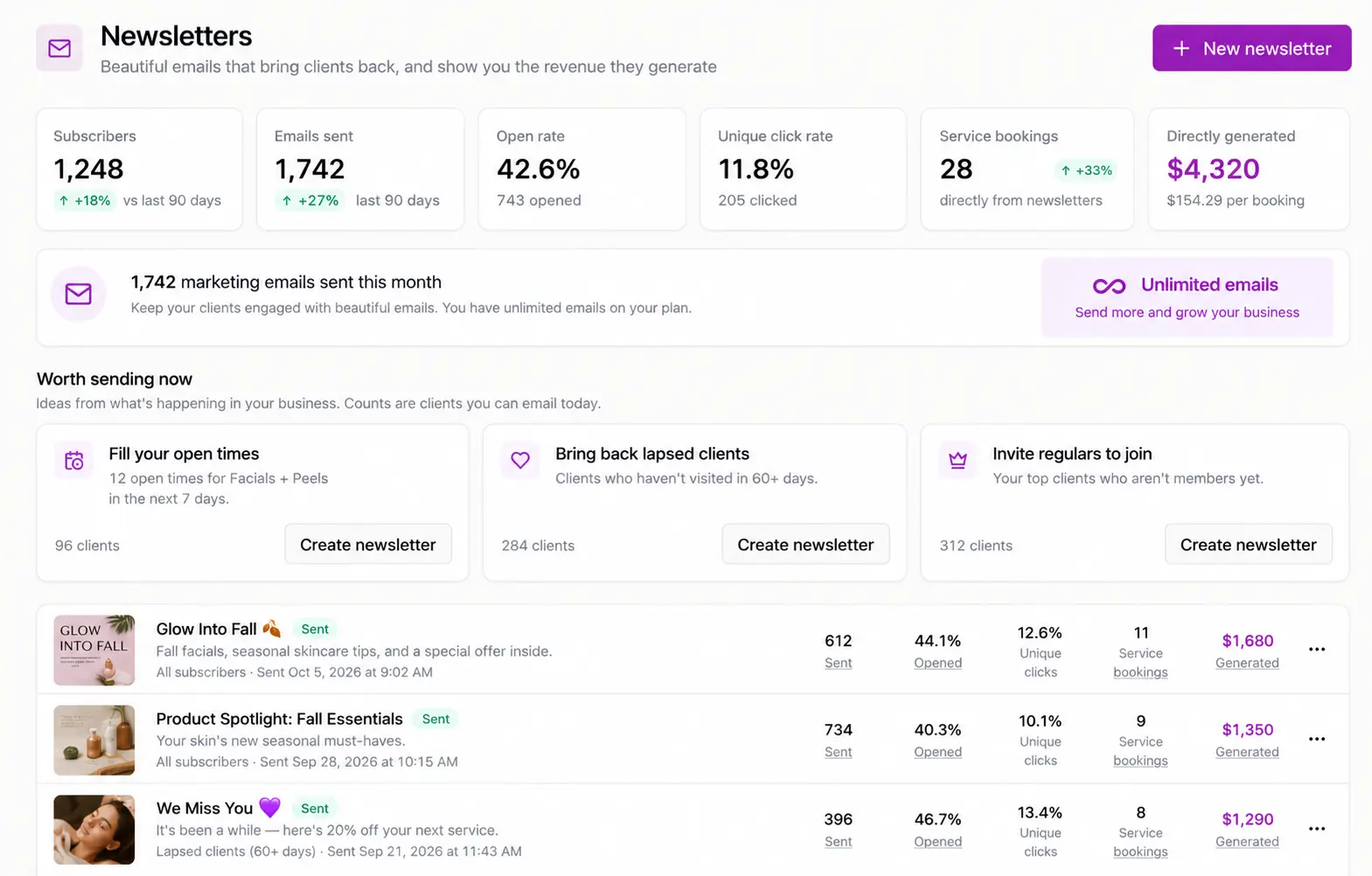
SpaSphere newsletters show you the part that matters: who booked, what they bought, and how much money the email made. That's possible because the newsletter is sent from the same place your clients book, pay and keep their client records.
Opens and Clicks Don't Pay Rent
A typical email marketing tool sees what happens inside the email. It knows the email was delivered, opened and clicked. It doesn't see your appointment book, your checkout or your retail sales, so the story stops at the click.
That leaves you guessing. Was the busy week because of the newsletter, or because it was the week before a holiday? Did the coupon bring anyone back, or did those clients come anyway? To find out, you'd have to export your bookings and match names against the click report by hand. Nobody does that, so most estheticians end up judging newsletters by open rate, or give up on them altogether.
Here's the difference in what you get to see:
| What you can see | A standalone email tool | A SpaSphere newsletter |
|---|---|---|
| Delivered, opened, clicked | Yes | Yes |
| Who booked an appointment afterward | No | Yes |
| Retail products she bought | No | Yes |
| Memberships, packages, treatment plans and gift cards sold | No | Yes |
| Money the email brought in, after refunds | No | Yes |
| Which part of the email earned it | Clicks only | Clicks and revenue |
The question a newsletter should answer isn't "how many people opened it?" It's "how much did it bring in?" In SpaSphere, the answer is on the report.
How SpaSphere Knows Who Booked and Who Bought
Because the email and the booking live in one system, SpaSphere can connect them on its own. Nothing to export, nothing to match.
Direct revenue: the number you can rely on
A booking, retail sale, membership, package, treatment plan or gift card counts as direct when one of these is true:
- She arrived through a link in the email.
- She used the personal coupon code from that email.
- She booked within 7 days of clicking.
Influenced revenue: shown separately, never added in
If she received the email in the 3 days before buying but didn't click, the sale counts as influenced. It's the honest "this probably helped," and it's always shown next to direct revenue, never added to it. You see "$X generated" and "+ $Y influenced" as two separate numbers.
Counted the way your bank account counts it
Revenue is money actually collected, with refunds taken out. Recurring membership dues don't count, so a member's monthly charge never makes a newsletter look better than it was.
What You Learn From the Report
Which part of the email worked
Results are broken down by block. If the barrier-repair facial block brought in four bookings and the retail block brought in none, you can see that, and you'll know what to lead with next month. The report also shows revenue per 1,000 emails compared with your own past newsletters, so you can tell whether this one did better or worse than usual. For any client counted in the results, a short note explains why she was counted.
Who still needs a nudge
From a sent newsletter, you can build the next audience in one step: clients who didn't click, clients who clicked but didn't book, or clients who clicked a specific block and didn't buy. The follow-up goes only to the people it's for.
Whether the discount earned its keep
Add a coupon block and choose a shared code, or a personal code for each recipient. Personal codes are single-use, so a code that ends up in a group chat doesn't turn into 40 discounts. Each personal code also tells the report exactly which newsletter earned the booking.
A Worked Example
Here's how it plays out for Lena, an esthetician in Austin. The numbers are illustrative, not a customer result.
Lena picks the "we miss you" template and sends it to clients who haven't visited in 60 days or more. The audience comes to 80 subscribers. She adds a personal 15% coupon for her $140 barrier-repair facial and a block showing her openings for the next two weeks.
A week later, her report shows:
- 6 direct bookings: 4 through the email link, 2 with personal codes
- 1 retail sale of a $48 serum, bought on one of those visits
- 2 influenced bookings, shown separately
Direct revenue after the coupon: 6 x $119 + $48 = $762, from one email to 80 people.
Then she builds a follow-up for the 11 clients who clicked but didn't book, and sends a shorter note with next week's openings.
With a standalone email tool, Lena would have seen a 50% open rate and a busy week. In SpaSphere, she knows the email made $762, that the facial block did the work, and which 11 clients still need a nudge.
The Same Records Make the Email Better, Too
The connection works in both directions. Because the newsletter is written where your client records live, it can use what you know about each client before you send.
Templates that already look like your studio
SpaSphere includes 11 starter newsletters, including a monthly note, a featured treatment, last-minute openings, a membership invite, a package reminder, a birthday note and a "we miss you" email. Each one opens already filled with your logo, your brand colors, your top services and, where it fits, an active coupon. You edit the words. You don't start from a blank page.
You build the email from blocks you drag into place: text, images, buttons, your services, retail products, a membership, a package, a treatment plan, a gift card, a coupon, reviews, a recent blog post, and your openings. The openings block pulls from your real availability, so "I have three spots next week" is true when she reads it.
Personal details from her record
Merge fields include her first name, her last treatment, the date of her last visit, how many days it's been, her next appointment, her membership and sessions, and her package balance. So one newsletter can read, for each client: "It's been 52 days since your HydraFacial, Dana." Nobody typed that 200 times.
Audiences from your client book
SpaSphere includes ready-made audiences: all subscribers, clients who haven't visited in 60 days or more, clients with nothing booked ahead, birthdays coming up, members, regulars with five or more visits in six months, VIPs, and recently joined. Combine up to eight to include or exclude, then save the audience for next time. See marketing segments for more.
Sophie can draft it, and you send it
Sophie, SpaSphere's AI coach, can suggest newsletters worth sending right now, show you who would receive them, and write a draft. Sophie only drafts. Nothing is scheduled or sent until you review it and press send.
Consent and Safety, Handled Before Anything Sends
Only clients who opted in receive a newsletter. Clients join through the opt-in checkbox on your booking form, which starts unchecked, or when you record their consent yourself, with a note on how they agreed. You can't upload an old list and start emailing it, which protects your sending reputation and your clients' trust. For ways to grow the list properly, see 15 ways to grow your email list.
Before every send, SpaSphere removes anyone who shouldn't receive it: clients who unsubscribed, emails that bounced, people who marked a past email as spam, and anyone you've emailed too recently. You see each excluded client and the reason. Every newsletter carries one-click unsubscribe, and clients can manage their preferences on your site.
If spam complaints or bounces on your newsletters climb past safe levels, SpaSphere pauses sending automatically, in line with what Google's email sender guidelines ask of bulk senders.
How Newsletters Fit With Your Automations
Newsletters are one-off or scheduled emails that you write. Marketing automations are the emails that send themselves when something happens, such as a welcome email, a birthday offer, a rebooking reminder or a reactivation email. Both use the same sending setup, the same monthly allowance and the same client records.
The newsletter is also where your treatment-room work continues between visits. A client in the middle of a treatment plan can get a note about what comes next. A member can see what's included this month. A client whose last treatment was a peel can get the post-peel note you promised her in the room.
What to Know Before You Start
SpaSphere newsletters are built for estheticians who want email tied to their bookings, not for marketers running large experiments. A few honest limits:
- No A/B testing. You send one version. The per-block report and the comparison with your past newsletters show what's working instead.
- Your list is your opted-in clients. You can't import a purchased or old mailing list, and newsletters go to clients in your SpaSphere client book.
- Emails send from a SpaSphere sending address with your spa's name, and your own reply-to address, so replies come to you. You don't need to set up your own sending domain.
- There's a monthly allowance. Each plan includes 500 marketing emails a month. Appointment and booking emails never count against it.
Common Mistakes When Measuring a Newsletter
Judging a newsletter by its open rate. Opens are a weak signal, and privacy features in some email apps report opens that never happened. Bookings and revenue are the real measure.
Adding "influenced" sales to the total. A client who was going to book anyway shouldn't make your newsletter look twice as good. Keep the direct number as your scorecard.
Discounting by default. A coupon in every email trains clients to wait. Use one when it has a job, like bringing back a lapsed client, and check the report to see if it paid for itself.
Never following up. The clients who clicked but didn't book were interested. A short follow-up to just them often does more than the first email.
Getting Started With SpaSphere Newsletters
- Turn on the booking-form opt-in and start asking at checkout, so your list grows from every visit.
- Pick a template. The monthly note or "we miss you" is a good first send.
- Choose an audience from your client book and review who's excluded and why.
- Write it like you talk in the room. How to write a newsletter clients actually read walks you through it.
- Send a test to yourself, check it on your phone, then send or schedule it.
- Read the report a week later: what it made, which block earned it, and who to follow up with.
FAQ
Q: Can I see how much money a newsletter made? A: Yes. SpaSphere shows the revenue each newsletter generated from bookings, retail, memberships, packages, treatment plans and gift cards, counted as money collected with refunds taken out.
Q: How does SpaSphere know which bookings came from a newsletter? A: A booking counts as direct when the client came through the email link, used her personal code, or booked within 7 days of clicking. Bookings within 3 days of receiving the email without a click are shown separately as influenced.
Q: Why can't my email marketing tool show bookings? A: A standalone email tool only sees the email itself: delivery, opens and clicks. The booking and the payment happen in a different system, so the two never meet unless you match them by hand.
Q: Can I import my existing mailing list into SpaSphere? A: No. Newsletters go to clients who opted in through your booking form or whose consent you recorded, which keeps your list clean and your emails out of spam folders.
Q: Do booking confirmations and reminders count toward my email allowance? A: No. Only marketing emails, meaning newsletters and marketing automations, count toward the monthly allowance.
A newsletter is worth sending when you can see what it did. In SpaSphere, every newsletter ends with the answer: who booked, what they bought, and how much it made. Then the next one gets better.
Send newsletters from where your clients book and see exactly how much each one brings in.