

Newsletters
Newsletters That Show You What They Earned
Send beautiful emails to your clients, then see who booked, what they bought, and how much each one made
Start from a template that already carries your logo and services, send it to the clients it's for, and a week later you'll know which newsletter worked, which part of it worked, and who still needs a nudge.
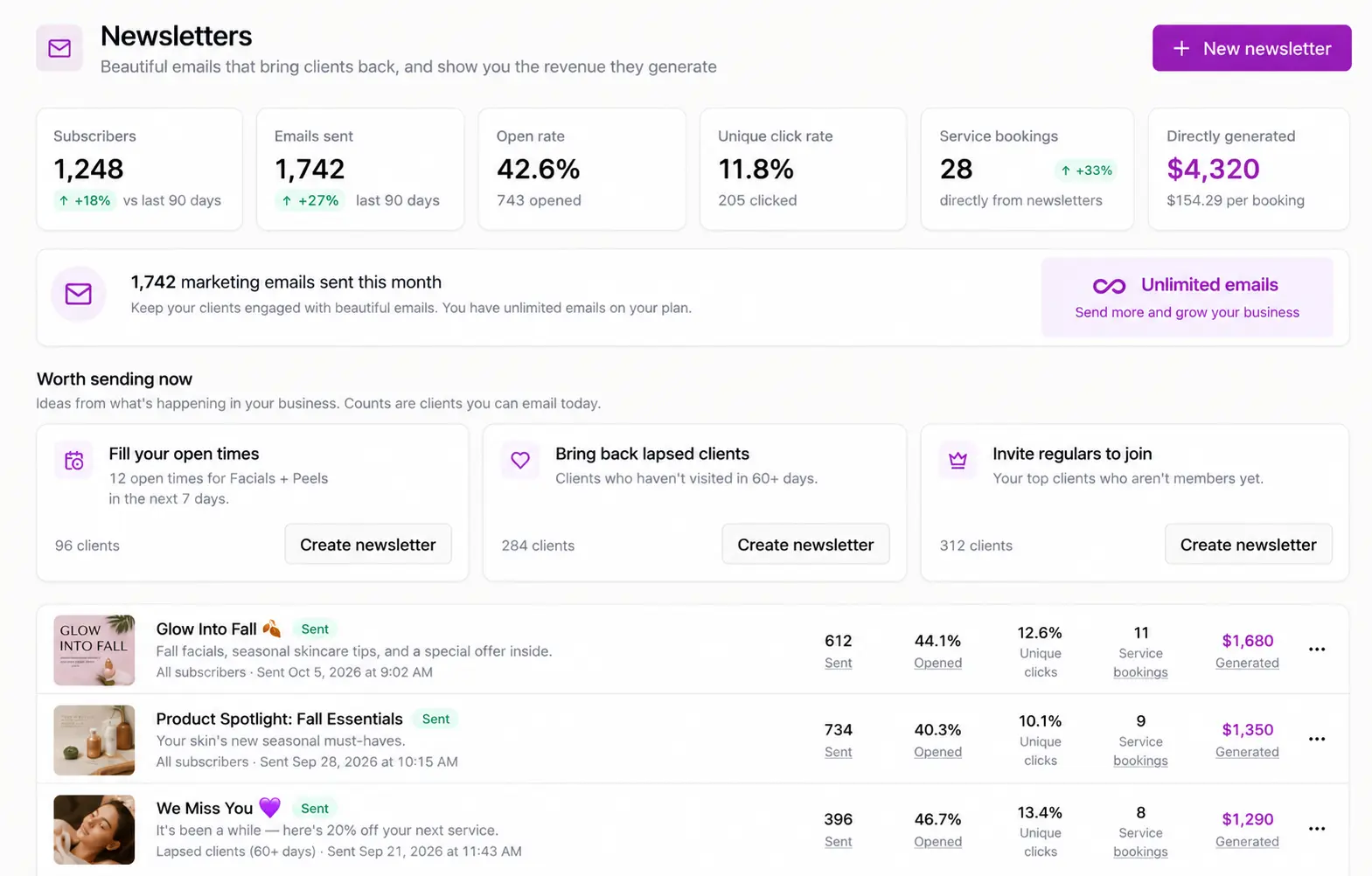
What you see after you hit send
A standalone email tool sees the email, not your appointment book or checkout. Its report ends at the click.
| What the report shows | Standalone email tool | SpaSphere newsletter |
|---|---|---|
| Delivered, opened, clicked | ||
| Who booked an appointment afterward | ||
| Retail products the client bought | ||
| Memberships, packages, treatment plans and gift cards sold | ||
| Money the newsletter brought in, after refunds | ||
| Which part of the email earned it | Clicks only | Clicks and revenue |
Your newsletter is sent from the same place your clients book and pay, so the report can follow the client from the inbox to the appointment.
It doesn't just tell you what happened. It tells you what to send next.
Your Newsletters page watches your book and suggests the emails worth sending today, with how many clients each one can reach right now.
Open times in the next 3 days?
Start a newsletter that lists them, built from your real availability.
Clients who haven't visited in 60+ days?
Start the win-back newsletter, already aimed at them.
Regulars who aren't members yet?
Start a membership invite for exactly those clients.
Packages expiring in the next 14 days?
Remind those clients to book before their sessions run out.
A past newsletter that made money?
Send it again, with what it generated last time shown on the card.
Sophie sees the same opportunities.
Ask her and she drafts the newsletter and shows you who it reaches. You decide whether to send it.
Everything in SpaSphere can go in your newsletter
Pick a service, a product or a treatment plan and drop it in. You don't retype a price or upload a photo twice.
Get them booked
Services
Price, duration and a Book button for up to three services.
Last-minute openings
Your real open times for a service in the next few days.
Providers
Photo, role and bio, with a button to book with them.
Sell what you offer
Retail products
Photo and price, linked to the product on your site.
Memberships
Price per month, quarter or year, linked to the sign-up page.
Packages
Price and how much the client saves versus booking separately.
Treatment plans
Price and savings, with a button to book a consultation.
Gift cards
A button straight to your gift card page.
Coupons
Code, terms and expiry date, or a single-use code for each client.
Give them a reason to read
Blog posts
Cover image, date and excerpt, linked to the post on your site.
Reviews
Your published five-star reviews, in your clients' own words.
Your brand
Logo, colors and social links from your website settings.
Prices, photos and coupon terms are read when the email sends, so they're never out of date, and anything you've archived since is left out. Every block is tracked, so the report shows which service, product or plan earned the sale.
Built for the Clients You're Actually Trying to Reach
Templates That Look Like Your Studio
11 starter newsletters, from a monthly note to last-minute openings, a membership invite and "we miss you". Each opens with your logo, brand colors and top services already in place.
Personalized From Each Client's Record
Merge in each client's first name, last treatment, days since the last visit, next appointment, membership sessions or package balance. One newsletter, personal to every client.
The Right Clients, Not Everyone
Ready-made audiences like lapsed 60+ days, nothing booked ahead, birthdays, members, regulars and VIPs. Combine up to eight to include or exclude, and save them for next time.
Personal Coupons That Can't Be Shared
Give each client a single-use code. A code that ends up in a group chat doesn't turn into 40 discounts, and every code tells the report which newsletter earned the booking.
Follow Up With the Ones Who Almost Booked
From any sent newsletter, email just the clients who clicked but didn't book, or clicked one block and didn't buy. The second email goes only to the people it's for.
How It Works
Pick a Starting Point
Choose a template, or one of the newsletters suggested as worth sending now, such as filling open times in the next 3 days.
Make It Yours
Edit the words, drag blocks into place, and preview it on desktop and mobile. Or ask Sophie for a first draft.
Choose Who Gets It
Pick an audience and see exactly who's included, who's excluded, and why. Send a test to yourself first.
Send or Schedule
Send now or schedule it in your own time zone. You can unschedule it any time before it goes out.
See What It Earned
Open the report for bookings, sales and revenue, see which block did the work, and follow up with who's left.
How SpaSphere counts the money
Every report shows “$X generated” and “+ $Y influenced” as two separate numbers, so you always know which one to trust.
Direct
The client clicked through from the email and purchased, used a personal coupon code from it, or booked within 7 days of clicking. This is the number you can rely on.
Influenced
The client received the email in the 3 days before buying but didn't click. Shown next to direct revenue, never added to it.
Counted like your bank account
Money actually collected, with refunds taken out. Recurring membership dues don't count, so a monthly charge never inflates a result.
The report also breaks results down by block, compares revenue per 1,000 emails with your own past newsletters, and explains why each client was counted.
Consent and delivery, handled
Only clients who asked to hear from you get a newsletter. Everything that protects your inbox reputation happens before you press send.
- Opt-in checkbox on your booking form, unchecked by default
- Record consent yourself, with a note on how the client agreed
- Unsubscribed, bounced and spam-complaint addresses removed before every send
- See every excluded client and the reason
- No client emailed too often, across newsletters
- One-click unsubscribe and a preferences page on your site
- Sending pauses automatically if complaints or bounces climb
- Your spa's name on every email, replies to your own address
Newsletters and automations
Newsletters are the emails you write and send when you have something to say. Marketing automations send themselves when something happens: a welcome, a birthday offer, a rebooking reminder. Both use the same client records and share the same 500 marketing emails a month.
Good to know
- No A/B testing. The per-block report and your own past results show what works instead.
- Opted-in clients only. You can't upload a purchased or old mailing list.
- Included, with a monthly allowance. Newsletters are part of your plan, which includes 500 marketing emails a month, shared by newsletters and marketing automations, plus 500 marketing texts for automations. Need more? Unlimited Email is $14.99 a month, with no limit on how many emails you send (terms apply). Appointment and booking emails never count.
Questions about newsletters
Clients who opted in, either through the checkbox on your booking form (unchecked by default) or when you record their consent with a note on how they agreed. Clients who unsubscribed, bounced or marked a past email as spam are removed automatically.
No. Newsletters go only to clients who opted in, which keeps your list clean and your emails out of spam folders.
No. Your plan includes 500 marketing emails a month, shared by newsletters and marketing automations, and appointment and booking emails never count against it.
Before you schedule a newsletter, SpaSphere checks that it fits in what's left of your 500. If you run out mid-send, the newsletter pauses instead of failing. Add Unlimited Email for $14.99 a month to finish sending it, with no limit on how many emails you send from then on, or it picks up again when your allowance resets on the 1st. Unlimited Email is covered by the email allowance and fair use section of our Terms of Service.
Sophie can suggest newsletters worth sending, show you who would receive them, and write a draft. She can't schedule or send anything. You review it and press send.
No. Newsletters send from a SpaSphere sending address with your spa's name, and you set your own reply-to address so replies come straight to you.
Ready to see what your newsletters earn?
Newsletters are included in your plan with 500 marketing emails a month. Need more? Unlimited Email is $14.99 a month, with no limit. Just $1 for your first 30 days.
✓ Cancel anytime · ✓ We move your data in 48 hours · ✓ No commitment