
Workflows
Client care that knows when to stay quiet
Thoughtful client care that runs on its own, and can stay quiet when she has already rebooked
Thirty days for $1, then SpaSphere Pro is $139 a month with four team members included.
You meant to check in after her facial. Then the week filled up. A workflow remembers for you: it waits the time you choose, can look at her bookings, and sends your note only if she hasn't booked her next visit. If she has, nothing goes out. Start from a ready-made workflow, describe one in a sentence and let Sophie draft it, or build your own, step by step.
The right follow-up, only when it's needed
When you choose, SpaSphere checks whether a client has rebooked before sending a follow-up. If she has, it stays quiet.


1 / 5
Maya finishes her Signature Facial
Her appointment is marked completed.
What if Maya already rebooked?
Sends a personal follow-up by email
“We miss you, Maya. It has been a few weeks since your facial. Book your next visit whenever suits you.”
The builder
Build it once. See every step.
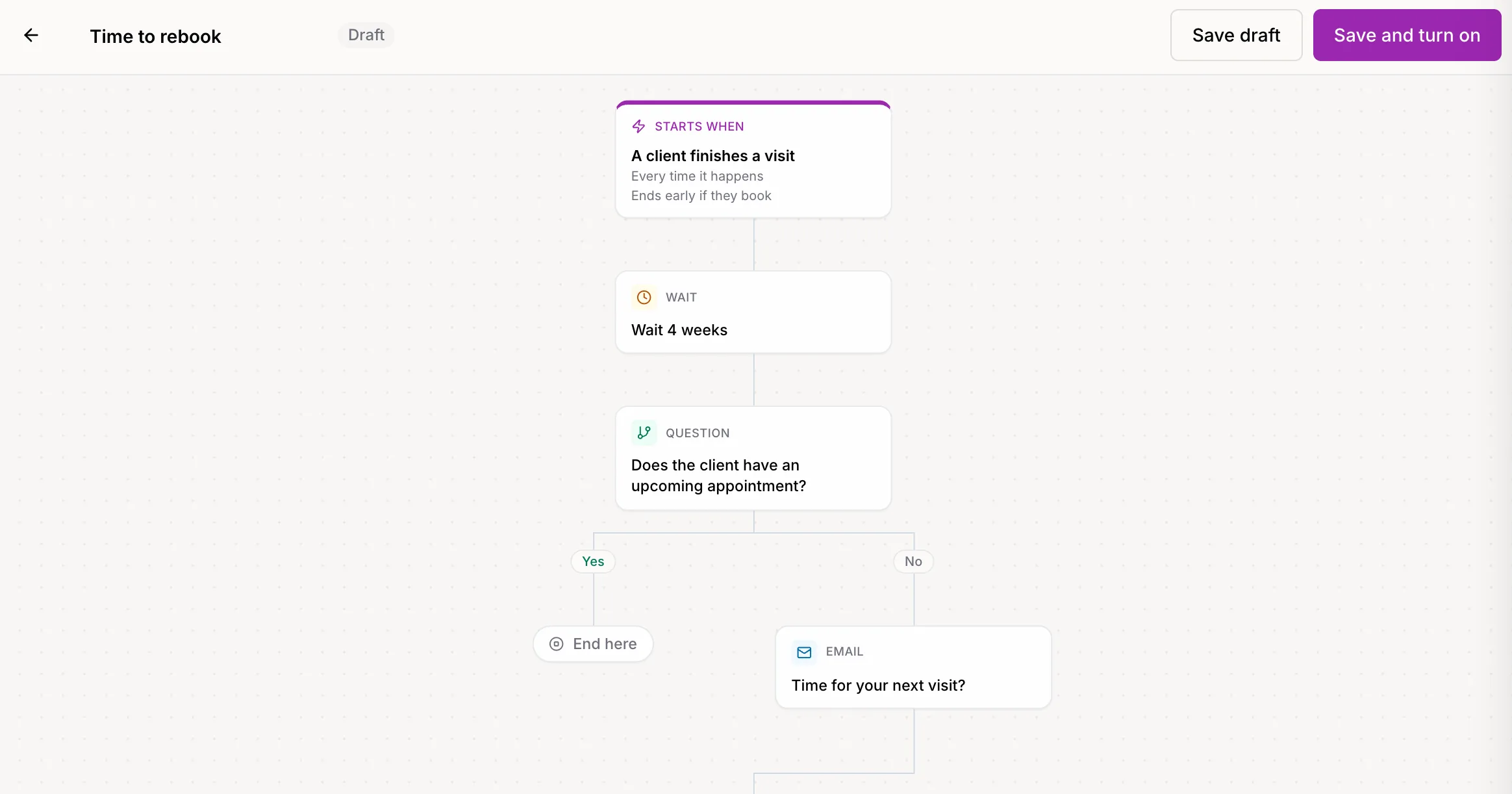
A workflow reads top to bottom, in plain words: what starts it, how long to wait, what to check, and what to send. This one is the ready-made "Time to rebook".
- Starts when a client finishes a visit, every time it happens
- Waits 4 weeks, then asks: does the client have an upcoming appointment?
- Yes: it ends quietly. No: it sends "Time for your next visit?"
- Ends early the moment she books, wherever she is in the workflow
What a workflow is made of
Six simple pieces, in plain words. Start from a template, ask Sophie, or put them together yourself.
Starts when
A new client is added, a first visit or any visit is finished, a client books, cancels, buys a package, starts or ends a membership, joins your email list, hasn't visited in a while, has a birthday, has a treatment plan session ready to book, or has membership perks about to run out.
Wait
Hours, days or weeks, or until a day of the week at a time you pick.
Ask a question
Yes or No: does she have an upcoming appointment, has she booked since starting, how many visits has she finished, is she a member, does she have package sessions or perks left, does she still owe intake forms?
Wait for something to happen
Wait for her to book, finish her next visit, buy a package or start a membership, with a time limit. Then go one way if it happened and another if time ran out.
Send an email
Designed with your newsletter blocks, in your brand, with her name in it.
End here
The client leaves the workflow. You can also have it end early the moment she books, buys a package or starts a membership.
Care That Feels Personal, Without the Mental Load
Quiet When She Already Booked
Ask "Does the client have an upcoming appointment?" before anything goes out, or end the workflow the moment she books. No nudges for clients who are already coming back.
19 Ready-Made Workflows
New client welcome, First visit follow-up, Time to rebook, We miss you (60 days), Cancellation recovery, Review request, Happy birthday, Unused package reminder, New member welcome and more, written and ready in your brand.
Describe It, Sophie Builds It
Say what should happen and when, in your own words. Sophie drafts the workflow and its emails, and you review everything before it goes live.
Each Client at Her Own Pace
Every client moves through on her own timeline, from the day her visit, booking or birthday starts it. Choose once per client, or every time it happens.
You Can See What It Did
Each workflow shows how many clients are in it, how many emails and texts it has sent, and how many times a client booked after starting it.
Safe to Change Your Mind
Edit a workflow any time: clients already in it finish the version they started. Pause it and they wait where they are until you turn it back on.
How It Works
Choose a Starting Point
Open Marketing > Workflows. Explore a ready-made workflow, ask Sophie to draft one from a sentence, or start from scratch.
Make It Yours
Adjust the waits and questions, and edit each email and text in your words. Pick what starts it, and what should end it early.
Turn It On
From then on, each client starts the workflow when the moment happens: a finished visit, a booking, a birthday.
Let It Look After Your Clients
At each question, SpaSphere Pro looks at her bookings, visits, membership or package as they are right then, sends only what is still useful, and shows you how often clients booked after starting it.
Inside SpaSphere Pro
Workflows live under Marketing, next to Newsletters.
Workflow templates
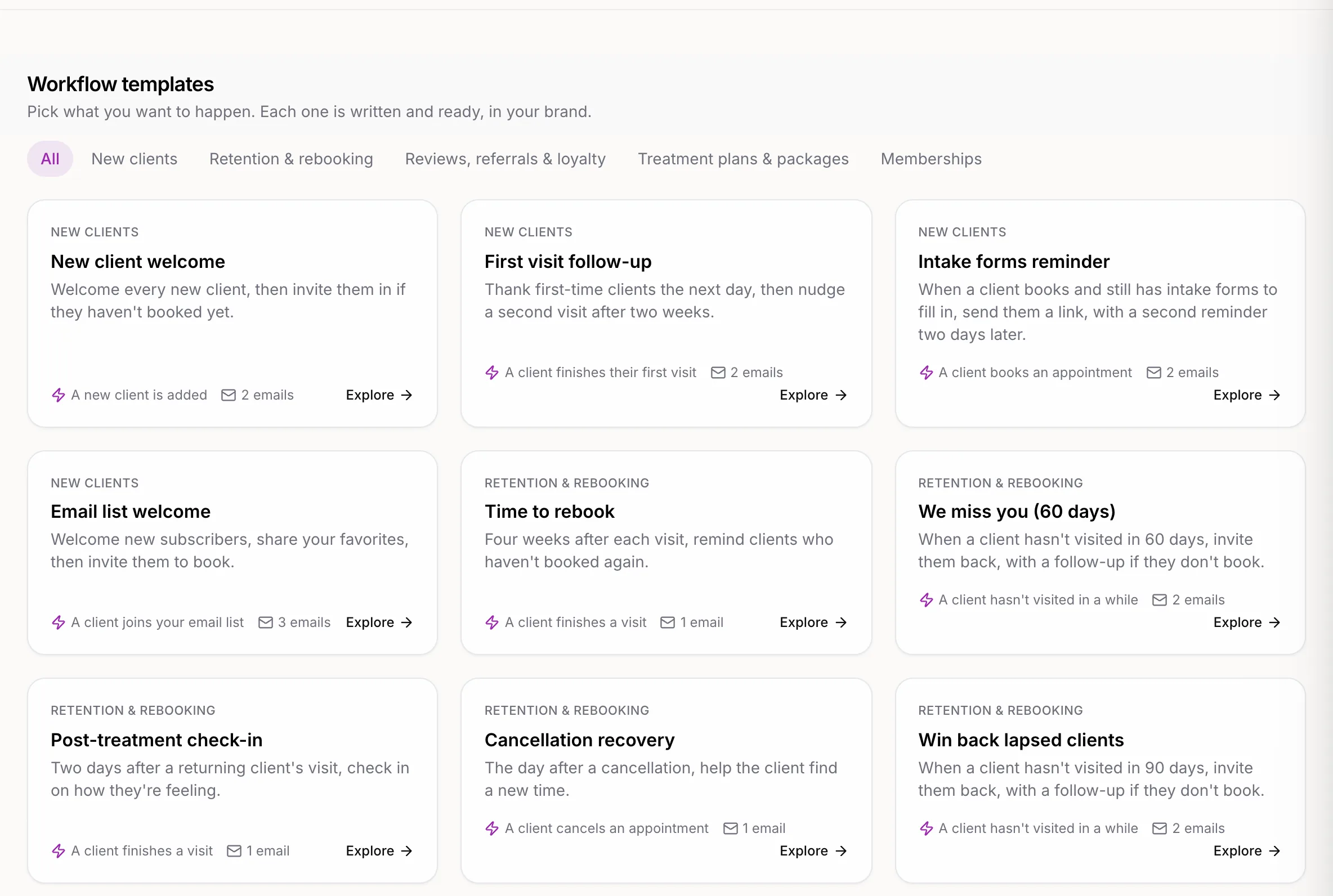
19 ready-made workflows, grouped by what you want to happen
Pick a goal and start from a workflow that is already written. Each one opens in your brand color, and nothing goes out until you turn it on.
- New clients, retention and rebooking, reviews and loyalty, treatment plans and packages, memberships, gift cards and sales
- Each card says what starts it and how many emails it sends
- Explore one to read every email before you use it
Your words, your brand
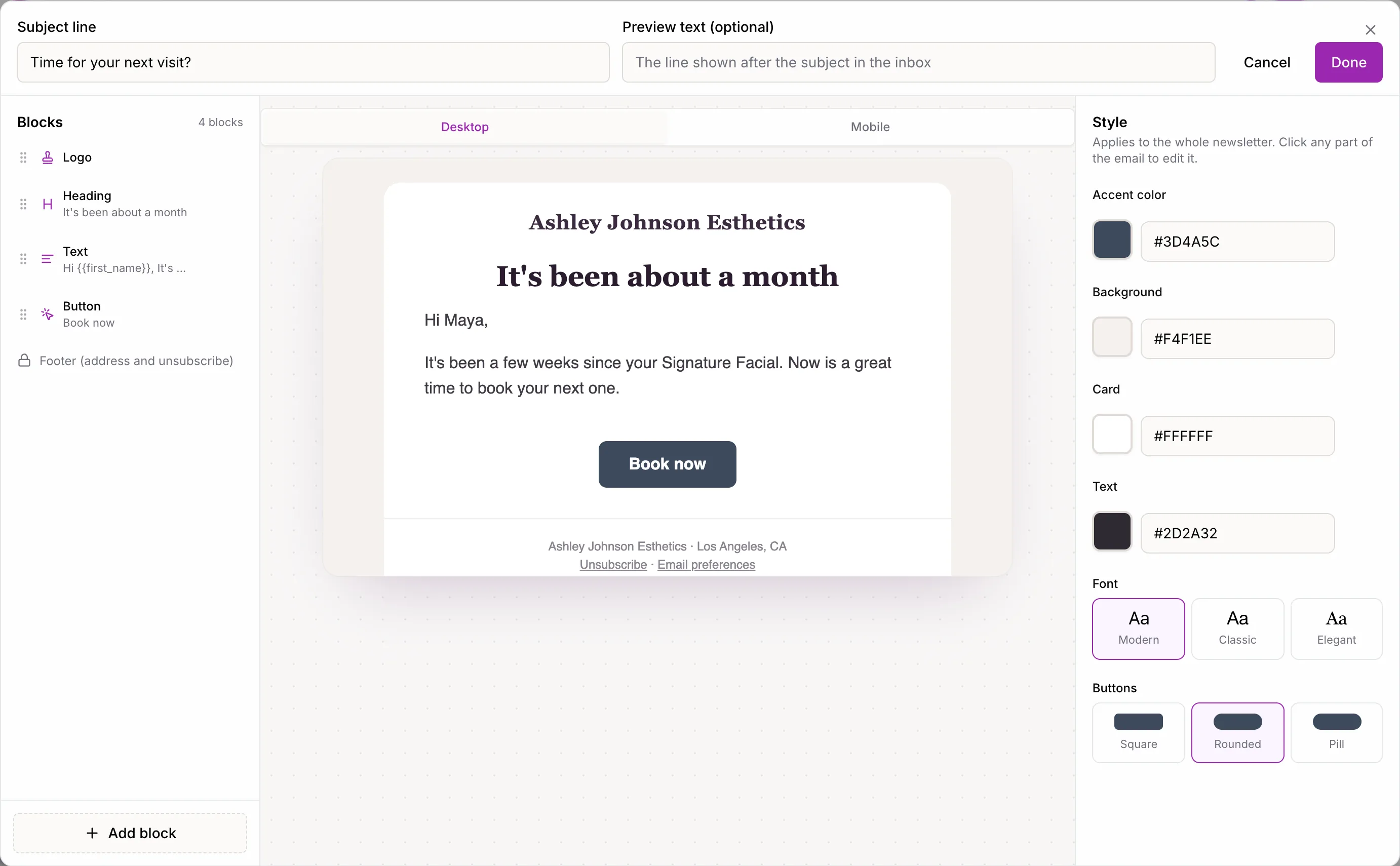
Every email is designed like a newsletter
Open any email step to edit the subject line and the email itself with the same blocks as your newsletters, with a desktop and mobile preview.
- Merge in the client's first name, last service and your business name
- Buttons can link to booking, your website, gift cards, memberships or reviews
- Or her intake forms for the booking that started it
Your workflows
See what it led to
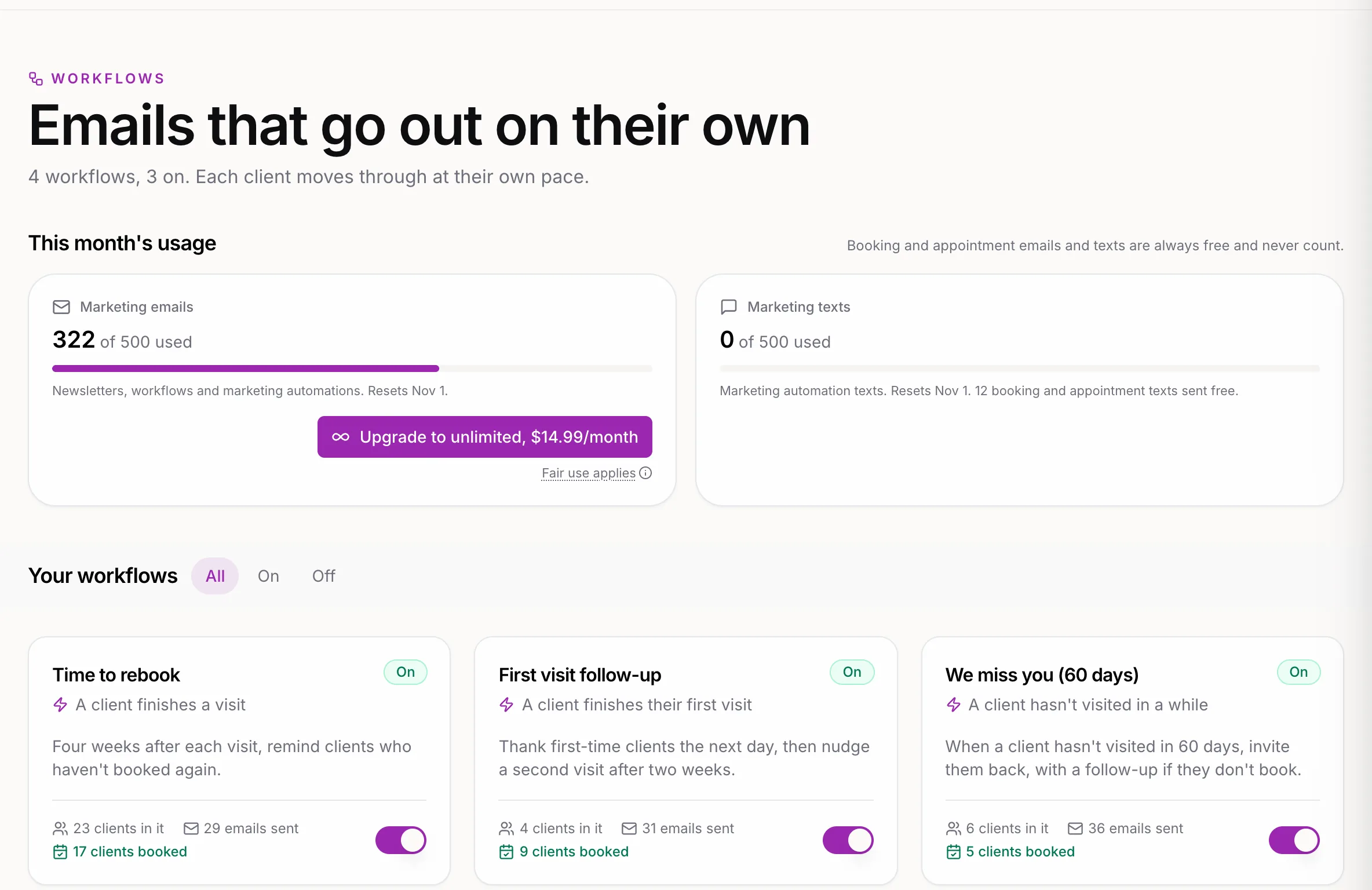
Every workflow shows how many clients are in it right now, how many emails it has sent, and how many clients booked after starting it, counted on the card as "clients booked".
- Turn a workflow on or pause it with one switch
- Paused? Clients already in it wait where they are and carry on when it's back on
- This month's marketing email use sits right above, so there are no surprises
Coming from automations?
Workflows replaced marketing automations. Running marketing automations, like welcomes, rebooking nudges and win-backs, moved over as workflows carrying their message, so nothing needs setting up again and no client gets the same message twice. Open one to read it over or fine-tune it. Workflows are the whole conversation: waits, questions, emails and texts, each client at her own pace.
Good to know
- Email and text. Texts go only to clients who agreed to get them, and replies land in Messages when you text from your own number.
- Included, with a monthly allowance. Workflow emails and texts share your 500 marketing messages a month with newsletters. Need more? Unlimited Email is $14.99 a month (terms apply).
Questions about workflows
Yes. A step can send an email or a text. Texts go only to clients who agreed to get texts, with an opt-out line. If you have Messages, they go out from your own number and replies land in your inbox.
No. Each client starts a workflow when the thing that starts it happens after you turn it on, like finishing a visit or booking. "Hasn't visited in a while", birthdays, treatment plan sessions and unused perks are checked once a day. The first check also picks up clients who reached that moment in the past few days, up to a week, so nobody who just qualified is missed.
That is what the Yes/No and "Stop early when" steps are for. Ask whether she has an upcoming appointment before an email goes out, or have the workflow end the moment she books. If she has, nothing is sent.
Yes. Each email counts as one of the 500 marketing emails your plan includes each month, shared with newsletters. Appointment confirmations, reminders and receipts never count.
The client waits at that email for up to 3 days, and you get a note in SpaSphere Pro and by email. Add Unlimited Email ($14.99 a month) within those 3 days and the waiting emails go out. After that, the email is skipped and the client moves on to the next step.
You choose: once per client, or every time it happens (after every visit, for example). Birthday workflows go out once a year. A client is never in the same workflow twice at the same time.
Clients who already started keep going on the version they started. New clients get your changes. Pausing a workflow holds everyone where they are until you turn it back on. An email that was already on its way when you paused still goes out.
Clients with an email address on file who haven't unsubscribed or turned off emails from you, and whose address isn't bouncing. Every email carries an unsubscribe link, and a client who unsubscribes leaves every workflow they're in.
Yes. Describe what should happen and when, in a sentence or two, and Sophie drafts the workflow and its emails. Nothing is saved or turned on until you review it.
Ready for follow-ups that know when to stay quiet?
Workflows come with SpaSphere Pro. Your plan includes 500 marketing messages a month, shared with newsletters. Just $1 for your first 30 days.
✓ Cancel anytime · ✓ We move your data in 48 hours · ✓ No commitment