

Client Care
Aftercare They Can Actually Find When They Need It
Pre-care and post-care instructions on one page of your website, organized into categories you define
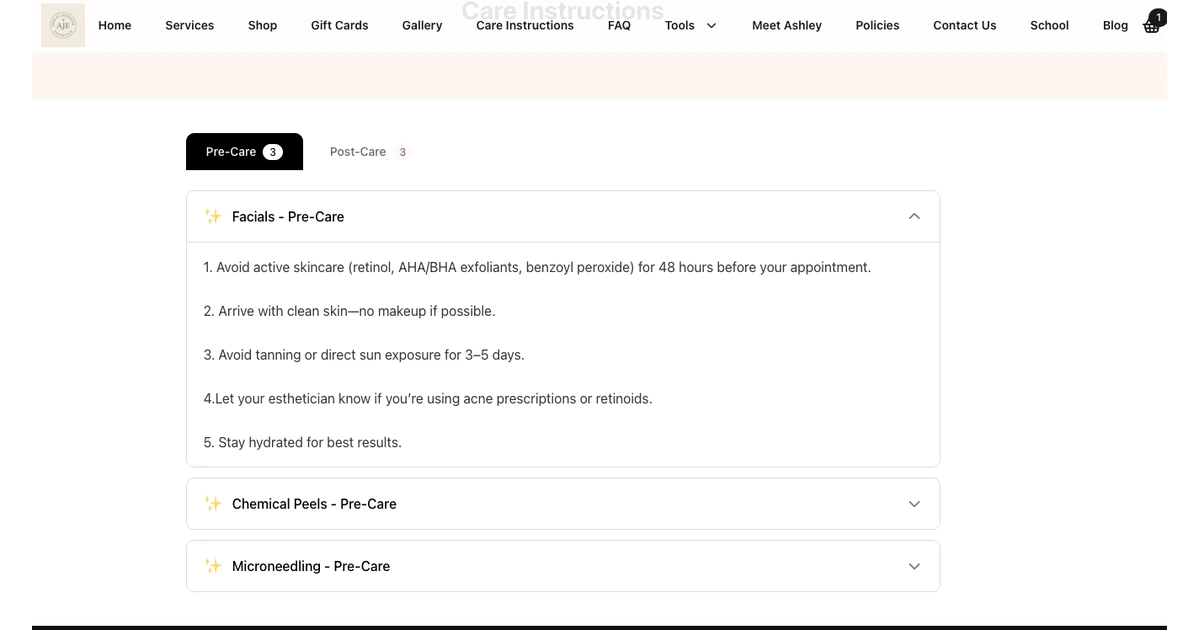
You spend 5 minutes explaining aftercare at the end of every appointment. The client nods, walks out, and immediately forgets half of it. Then they text you at 9pm asking if they can use retinol. SpaSphere gives you a Care Instructions page on your website, with pre-care and post-care organized into categories you define, that clients can revisit anytime. Prep for a specific service, like pausing retinol before a peel, can go out in the confirmation and reminder emails for that service. You write it once, update it when protocols change, and stop repeating yourself.
Why You'll Love It
Fewer 'Can I Use This?' Texts at Night
When clients have a clear, always-available reference page, they check the website instead of texting you. Your evenings stay yours.
A Better Chance at the Result
Clear aftercare gives your client a better chance of the result you're both working toward. Instructions she can reopen are easier to follow.
One Page, Always Current
Group pre-care and post-care into categories, such as peels or extractions. When you update your protocol, update the page - every client sees the latest version.
Published on Your Branded Website
Care pages live on your SpaSphere website with your branding, colors, and domain. They look professional and feel like part of your practice.
Zero Paper Waste
No more printing aftercare sheets that end up crumpled in a purse. Digital pages are better for the environment and easier for clients to access.
How It Works
Write Your Care Instructions
Build Pre-Care (what to do before the appointment) and Post-Care (aftercare) categories. Each one has a title, an icon, and the instructions.
They Appear on Your Website
Your categories show on the Care Instructions page of your spa website, under Pre-Care and Post-Care tabs. No code, no separate publishing step.
Put Service Prep in Her Emails
Add client instructions to a service and they're included in her confirmation, reminder and reschedule emails for that service. The full care page stays on your website for anything else.
Ready to stop repeating aftercare instructions?
Publish care pages to your website in minutes. Start your $1 trial today.
✓ Cancel anytime · ✓ We move your data in 48 hours · ✓ No commitment